Focus Matrix Pro Just Got a Brain: Introducing AI
Eight months ago we shipped Focus Matrix Pro with one goal: make the Eisenhower Matrix usable enough to become a daily habit. Drag-and-drop quadrants, swipe gestures, widgets, insights — the basics, done right. You told us it worked. The matrix gave you a way to think about your day.
Today's update gives the matrix a brain.
Four new AI features are rolling out together, and they all answer the same question: what should I do next? Not by adding more tasks, but by removing the friction of deciding where each task belongs. Sign in to try every one of them free for seven days. No credit card. Nothing charges automatically when the trial ends.
Here's what's new.
AI Knows Where It Goes
The hardest part of using the matrix isn't drawing it. It's deciding which quadrant a task belongs in. Is "review the Q3 forecast" urgent? Is "learn TypeScript" important? Most people quit the framework here — not because it's wrong, but because the categorization tax adds up across thirty tasks a week.
Start typing a task and AI suggests the right quadrant before you finish.
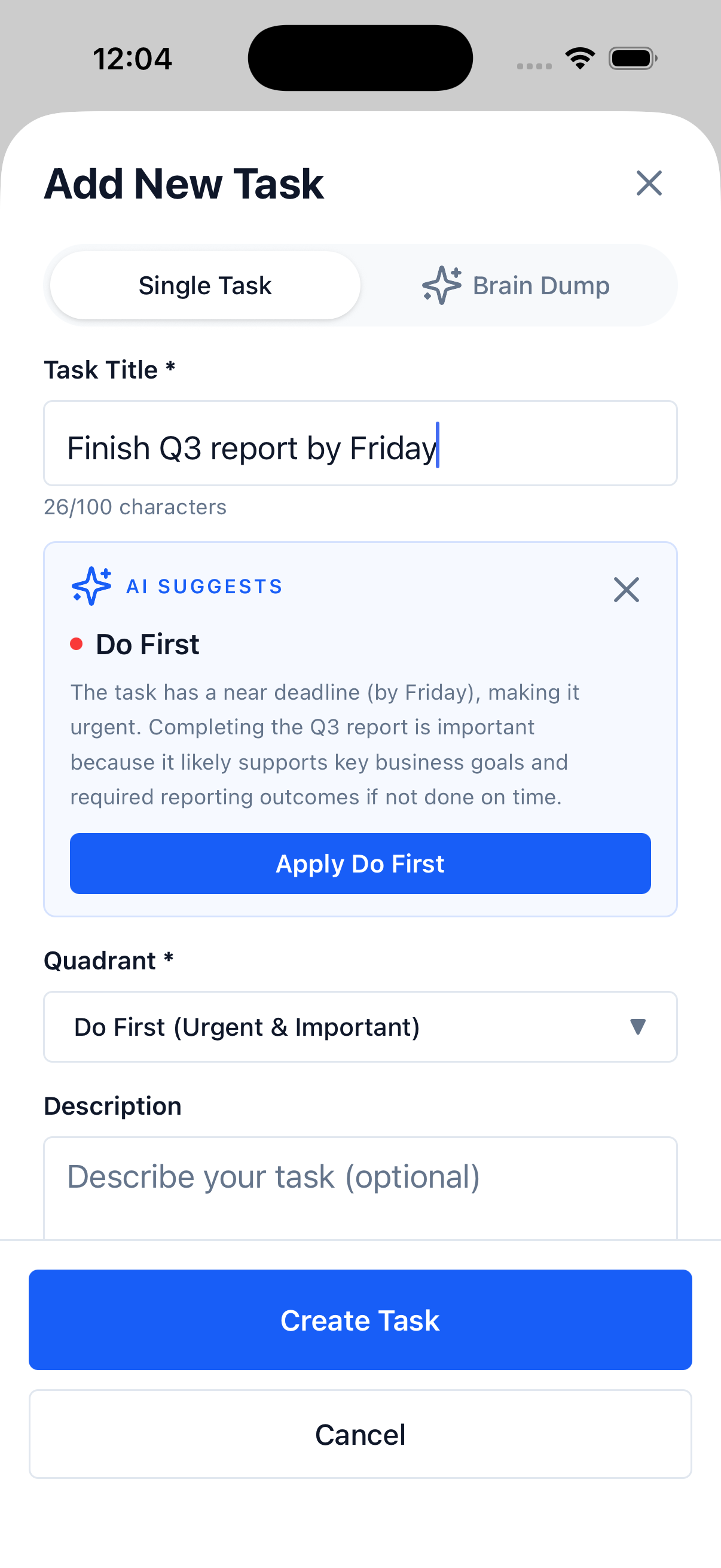
"Board deck for Thursday" lands in Do First. "Refactor that legacy doc" goes to Schedule. "Reply to the vendor follow-ups" becomes Delegate. The AI also tells you why, so you can disagree and override — your matrix, your call.
Free users get 10 AI suggestions per month. Pro unlocks unlimited suggestions plus auto-mode, where the AI assigns the quadrant the moment you finish typing.
Dump It. We'll Sort It.
The single biggest day-to-day shift in this update is the brain dump.
You know the feeling. Twenty things on your mind. Half are deadlines, half are vague "I should…" thoughts. The list isn't actually a list — it's a static charge in your head. Sitting down to write all of it out, then sort each item into a quadrant, takes more energy than you have at 9 a.m. on a Monday.
So we built a faster path: speak or type the whole stream, and AI parses it into discrete tasks with the right quadrant already assigned.
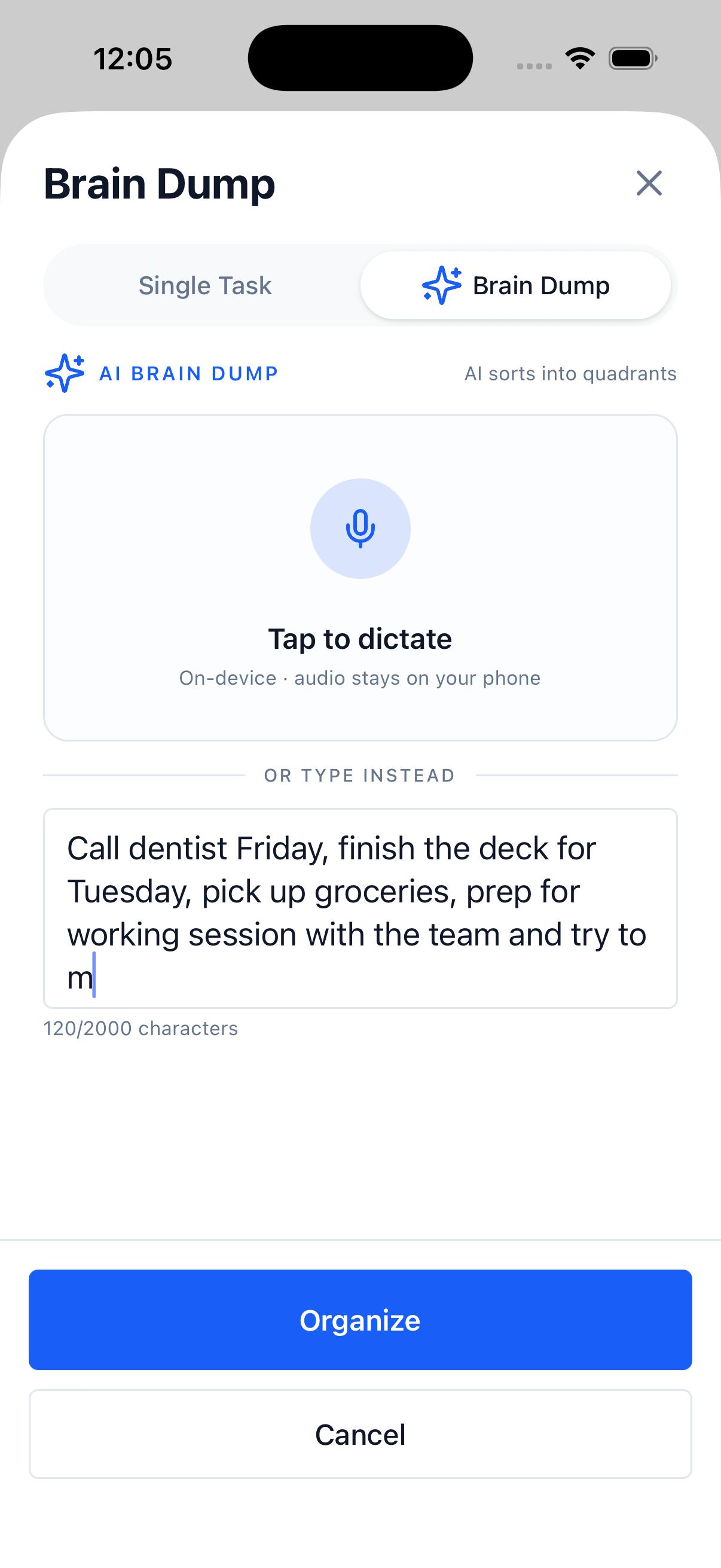
Voice or text. Twenty scattered thoughts become four to six clean tasks, each in the right place, in under fifteen seconds. Best moments to use it: the start of a week, after a meeting that left you with six follow-ups, or any time your head feels too full to function.
Brain dump is Pro-only, but the trial gives every new user seven days of unlimited dumps. The onboarding flow lets you try it once before sign-in — that's the moment most people see why this changes the framework.
Your Top 3, Every Morning
The Eisenhower Matrix sorts tasks. It doesn't tell you which task to start with.
That's the job of the new Smart Daily Focus. Open the app in the morning and the Insights tab surfaces the three tasks worth your full attention today — picked by AI from your matrix using deadlines, priority, recency, and the patterns of what you actually complete.
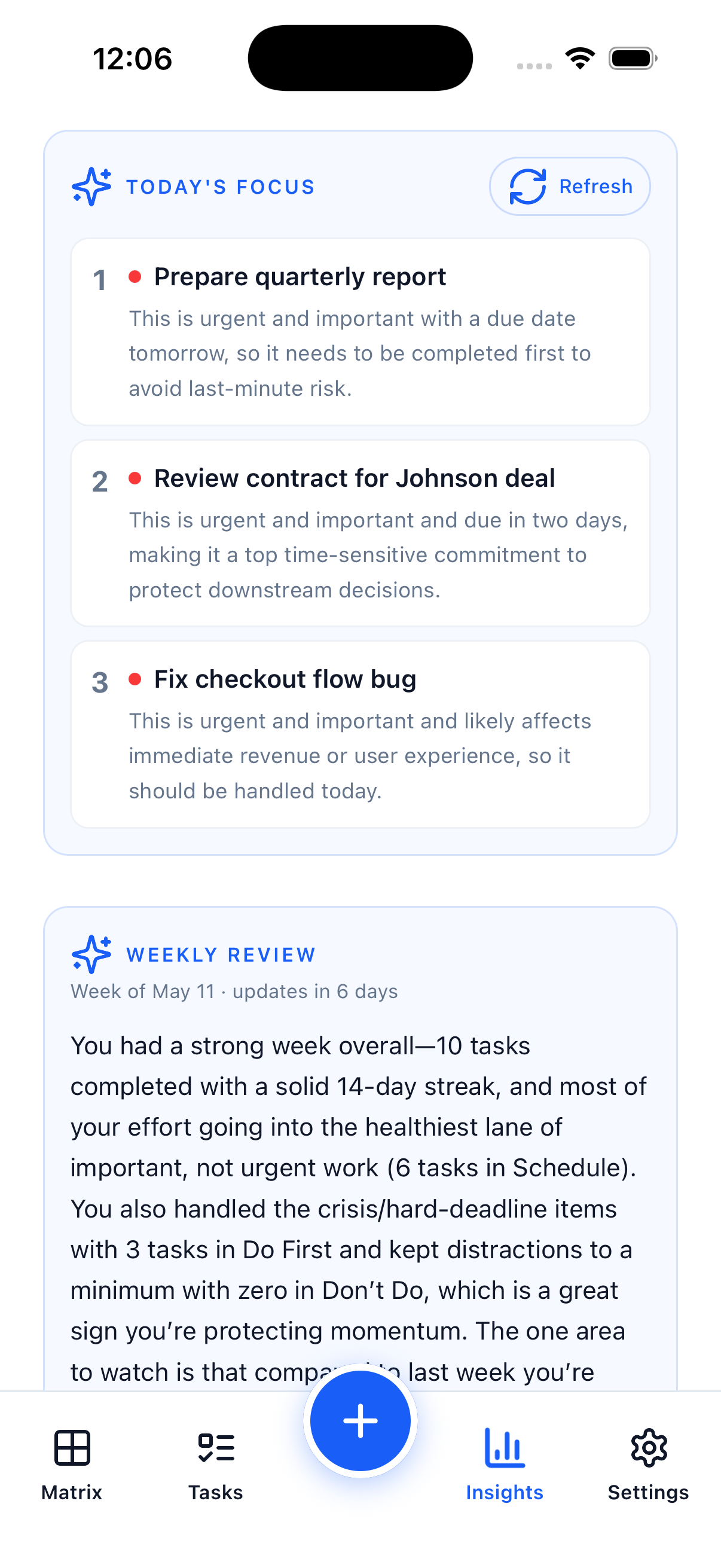
Three isn't an arbitrary number. It's the count most people can actually finish on a busy day, and it forces the matrix to keep doing its job: distinguishing "everything that's pressing" from "what actually moves the needle."
Free users see today's top 3 inside the app. Pro adds a morning notification — one quiet ping with the day's top priority. No spam, no nagging. Just the rhythm of a working day.
Your Personal Productivity Coach
Every Monday, AI writes you a short coaching note about the week you just finished.
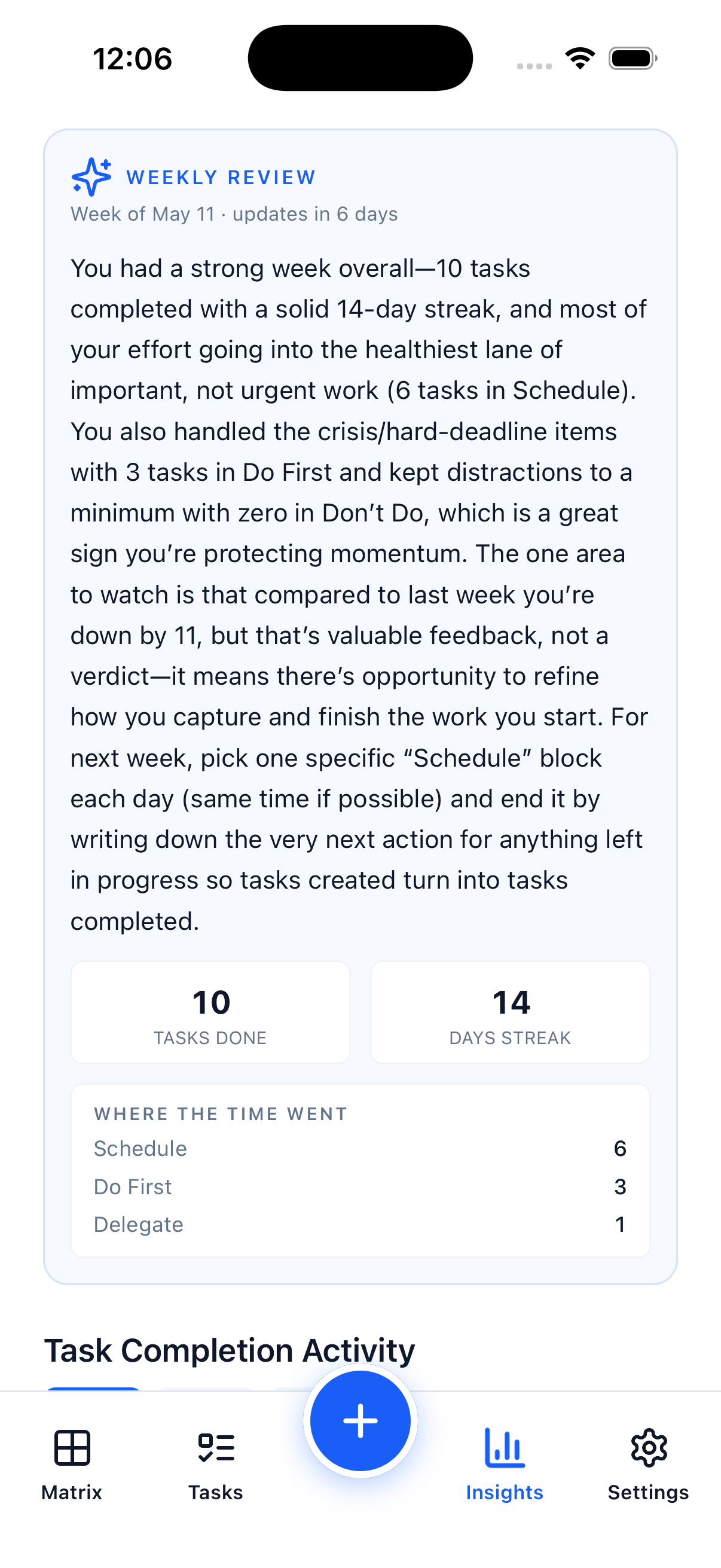
It's not a leaderboard or a streak guilt-trip. It's a paragraph of honest, personalized feedback:
"You completed 18 tasks this week — solid output. But 70% lived in Do First, which means you spent most of your time reacting. The Schedule quadrant has eight items that have been there for two weeks. Next week, pick one and protect time for it before the urgent stuff arrives."
That's the kind of read-back you can't write for yourself. AI sees the patterns that you can't see while you're inside them.
The weekly review is free for every signed-in user — no Pro required, no credits consumed. It's not a conversion lever; it's a retention feature. We want you to stay engaged. The coaching makes the matrix better at its job.
The 7-Day Trial — How It Actually Works
We wanted to make trying the AI features as low-friction as possible. So:
- No credit card. You'll never enter payment info to start the trial. Sign in with Google, Apple, or Facebook and it begins instantly.
- Nothing charges automatically. When the seven days end, you simply lose access to the Pro AI features. No surprise bills, no cancellation flow to navigate.
- You keep the core matrix forever. Unlimited tasks, all 10 themes, widgets, swipe gestures, 10 AI suggestions per month, and the weekly coaching review stay free for life.
- Trial unlocks unlimited AI, plus brain dump, smart daily focus with notifications, recurring tasks, and full widgets. Cloud sync stays opt-in and Pro-only — that one is a subscription feature.
Sign in, brain dump your week, and see if it clicks. If it doesn't, the matrix is still yours.
What's in Each Tier After the Trial
| What you get | Free | Pro |
|---|---|---|
| Full Eisenhower Matrix | ✓ | ✓ |
| Unlimited tasks | ✓ | ✓ |
| All 10 color themes | ✓ | ✓ |
| Insights, streaks, heatmap | ✓ | ✓ |
| AI quadrant suggestions | 10/month | Unlimited + auto-mode |
| Weekly AI coaching review | ✓ | ✓ |
| Brain dump (voice + AI) | — | Unlimited |
| Smart daily focus + notifications | View only | Notifications + Pro polish |
| Recurring tasks | — | ✓ |
| Real-time cloud sync | — | ✓ |
| Full interactive widgets | Basic | Full |
Pro is $2.99/month or $19.99/year (save 44%). The annual plan works out to about $1.67 a month, billed once.
On Privacy
Your tasks live on your device by default. Nothing leaves your phone unless you turn on cloud sync, and that's an explicit Pro setting you opt into. AI requests are anonymous and never used to train any AI model — they exist only to generate your suggestion and are not associated with your account.
This is the same product we shipped eight months ago. We just made it think.
How to Get Started
The update is rolling out today on iOS, Android, and the web. Open the app, sign in, and the trial starts.
- iOS: Open the App Store, search "Focus Matrix Pro," and update. Tap the Brain Dump button on the Add Task screen to try it first.
- Android: Update via Google Play. Same Brain Dump entry point.
- Web: Visit app.focusmatrix.app and sign in. Web has full AI feature parity with mobile.
If you've been using the matrix manually and the AI suggestions feel wrong for your workflow, override them — every suggestion has an Apply or dismiss button, and your edits teach the system what "urgent" and "important" mean for you specifically.
If you have questions about the trial, the pricing, or anything else, drop us a note. We read every message.
Onward.